> ## Documentation Index
> Fetch the complete documentation index at: https://docs.near.org/llms.txt
> Use this file to discover all available pages before exploring further.
# Signing Transactions
> Learn how to sign transactions across multiple blockchains.
export const Github = ({url, start, end, fname, withSourceLink = true}) => {
const [code, setCode] = useState(null);
function toRaw(ref) {
const fullUrl = ref.slice(ref.indexOf('https'));
const [url] = fullUrl.split('#');
const [org, repo, , branch, ...pathSeg] = new URL(url).pathname.split('/').slice(1);
return `https://raw.githubusercontent.com/${org}/${repo}/${branch}/${pathSeg.join('/')}`;
}
async function fetchCode(url, fromLine, toLine) {
let res;
if (typeof window !== 'undefined') {
const validUntil = localStorage.getItem(`${url}-until`);
if (validUntil && Number(validUntil) > Date.now()) {
res = localStorage.getItem(url);
}
}
if (!res) {
try {
res = await (await fetch(url)).text();
if (typeof window !== 'undefined') {
localStorage.setItem(url, res);
localStorage.setItem(`${url}-until`, String(Date.now() + 60000));
}
} catch {
return 'Error fetching code, please try reloading';
}
}
let body = res.split('\n');
const from = fromLine ? Number(fromLine) - 1 : 0;
const to = toLine ? Number(toLine) : body.length;
body = body.slice(from, to);
const precedingSpace = body.reduce((prev, line) => {
if (line.length === 0) return prev;
const spaces = line.match(/^\s+/);
if (spaces) return Math.min(prev, spaces[0].length);
return 0;
}, Infinity);
return body.map(line => line.slice(precedingSpace === Infinity ? 0 : precedingSpace)).join('\n');
}
function buildSourceUrl(url, start, end) {
const base = url.split('#')[0];
if (start && end) return `${base}#L${start}-L${end}`;
if (start) return `${base}#L${start}`;
return base;
}
useEffect(() => {
const rawUrl = toRaw(url);
fetchCode(rawUrl, start, end).then(res => setCode(res));
}, [url, start, end]);
const sourceUrl = buildSourceUrl(url, start, end);
const startLine = start ? Number(start) : 1;
const fileName = fname ?? sourceUrl.split('/').pop();
return
{}
{start && end &&
Lines {start}–{end}
}
{}
{code === null ?
Loading...
:
{code.split('\n').map((line, i) =>
|
{startLine + i}
|
{line || ' '}
|
)}
}
{}
{withSourceLink &&
}
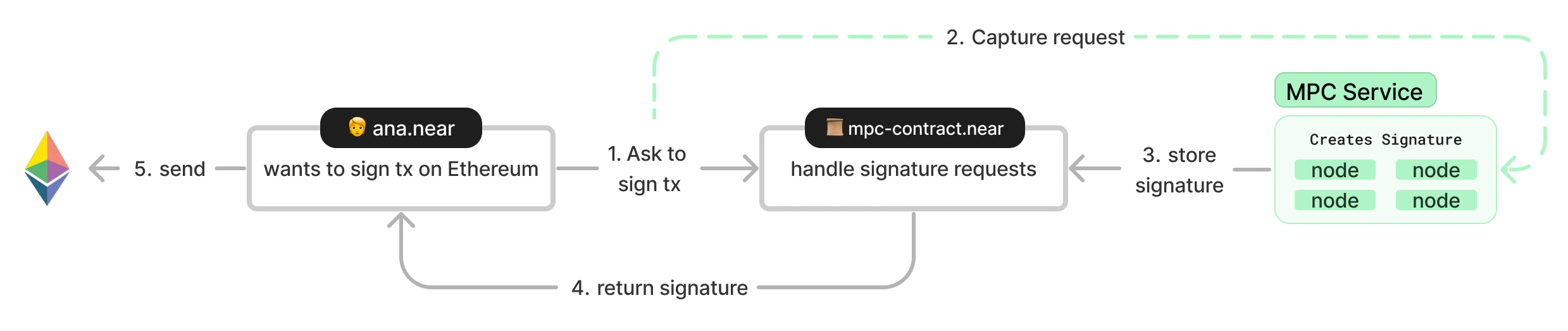 *Diagram of a chain signature in NEAR*
The [chainsig.js](https://github.com/NearDeFi/chainsig.js) library provides a convenient interface for completing each of these steps.
For building transactions inside of NEAR smart contracts written in Rust, you can use the [Omni Transaction](https://github.com/near/omni-transaction-rs) library to easily build transactions for different blockchains (like Bitcoin and Ethereum).
**MPC Contracts**
There is an [MPC contract](https://github.com/Near-One/mpc/tree/main/libs/chain-signatures/contract) available on both `mainnet` and `testnet`:
* Mainnet: `v1.signer`
* Testnet: `v1.signer-prod.testnet`
The MPC network is made up of 8 nodes.
***
## Chain Signatures Contract
To interact with the chain signatures library you first need to instantiate a `ChainSignaturesContract`.
The `networkId` and `contractId` are set to the values specified in the previous section depending which network you are on.
***
## Chain Adapters
To interact with a specific chain, you need to instantiate the relevant `chainAdapter`.
The EVM chain adapter takes the `ChainSignaturesContract` as an argument as well as `publicClient` which is constructed from an EVM RPC URL.
To use different EVM networks, simply specify the RPC URL for your desired network.
The example demonstrates compatibility with multiple EVM-compatible networks including Ethereum, Base, BNB Chain, Avalanche, Polygon, Arbitrum, zkSync, and many others.
You can find RPC URLs for various networks at [ChainList](https://chainlist.org/?testnets=true).
The Bitcoin chain adapter takes the `ChainSignaturesContract` as an argument as well as the `network` ("mainnet", "testnet" or "regtest") and a `btcRpcAdapter` which handles communication with the Bitcoin network.
The Solana chain adapter takes the `ChainSignaturesContract` as an argument as well as a `connection` which is constructed from a Solana RPC URL. If you want to use Mainnet, then you need to choose a Mainnet RPC.
The XRP chain adapter takes the `ChainSignaturesContract` as an argument as well as an `rpcUrl` for the XRP Ledger and the `rpcURl` specification. For testnet, use `https://s.altnet.rippletest.net:51234`.
The SUI chain adapter takes the `ChainSignaturesContract` as an argument as well as a `connection` which is a SuiClient constructed from a SUI RPC URL.
The Aptos chain adapter takes the `ChainSignaturesContract` as an argument as well as a `nodeUrl` for the Aptos network and the `network` specification.
***
## 1. Deriving the Foreign Address
Chain Signatures use [`derivation paths`](../chain-signatures#derivation-paths-one-account-multiple-chains) to represent accounts on the target blockchain. The foreign address to be controlled can be deterministically derived from:
* The NEAR account calling the MPC contract (e.g., `example.near`, `example.testnet`, etc.)
* A derivation path (a string such as `ethereum-1`, `ethereum-2`, etc.)
* The MPC service's master public key (we don't need to worry about this as it is defined in the library we're using).
To derive the address call the `deriveAddressAndPublicKey` method passing the near account Id from which the address is being derived and the derivation path.
On Solana, your address is the same as your public key.
The same NEAR account and path will always produce the same address on the target blockchain.
* `example.near` + `ethereum-1` = `0x1b48b83a308ea4beb845db088180dc3389f8aa3b`
* `example.near` + `ethereum-2` = `0x99c5d3025dc736541f2d97c3ef3c90de4d221315`
***
## 2. Creating the Transaction
To construct the transaction to be signed use the method `prepareTransactionForSigning`.
Constructing a transaction to transfer ETH is very simple. The `value` is the amount of ETH in Wei as type BigInt (1 ETH = 1018 Wei).
This method returns the `unsigned transaction` and the transaction `hash(es)` (also known as the `payload`).
Constructing a transaction to transfer BTC is very simple. The `value` is the amount of BTC in satoshis as a string (1 BTC = 100,000,000 sats).
This method returns the `unsigned transaction` and the transaction `hash(es)` (also known as the `payload`).
Constructing a transaction to transfer SOL is very simple. The `value` is the amount of SOL in lamports as type BigInt (1 SOL = 1,000,000,000 lamports).
This method returns the `unsigned transaction`.
Constructing a transaction to transfer XRP is straightforward. The `value` is the amount of XRP in drops as a string (1 XRP = 1,000,000 drops).
This method returns the `unsigned transaction` and the transaction `hash` (also known as the `payload`).
Constructing a transaction to transfer SUI is simple. The `value` is the amount of SUI in MIST as type BigInt (1 SUI = 1,000,000,000 MIST).
This method returns the `unsigned transaction` and the transaction `hash` (also known as the `payload`).
Constructing a transaction to transfer APT is straightforward. The `value` is the amount of APT in octas as type BigInt (1 APT = 100,000,000 octas).
This method returns the `unsigned transaction` and the transaction `hash` (also known as the `payload`).
To call a function on a smart contract we need the ABI of the contract, in our repo this is defined in the [config.js](https://github.com/near-examples/near-multichain/blob/main/src/config.js#L23-L63) file (this can be gathered from Remix or using Etherscan).
Then define a `Contract` object using the `ethers` library
Then to construct the transaction
This approach allows you to call smart contract functions by encoding the function data and including it in the transaction.
***
## 3. Requesting the Signature
Once the transaction is created and ready to be signed, a signature request is made by calling `sign` on the MPC smart contract.
The method requires four parameters:
1. The `payloads` (or hashes) to be signed for the target blockchain
2. The derivation `path` for the account we want to use to sign the transaction
3. The `keyType`, `Ecdsa` for `Secp256k1` signatures and `Eddsa` for `Ed25519` signatures.
4. The `signerAccount` which contains the `accountId` that is signing and the `signAndSendTransactions` function from [Near Connect](../../web3-apps/tutorials/wallet-login).
For Bitcoin, it is common to have multiple UTXOs to sign when sending a single transaction. We create a NEAR transaction (to call `sign` on the MPC contract) for each UTXO and send them to be signed by the MPC individually. Each signature is then parsed from each transaction outcome to produce an array of signatures.
To get the payload, serialize the transaction to a `uint8Array` and then convert it to hex.
***
## 4. Formatting the Signature
Once the signature is returned from the MPC it needs to be formatted and added to the transaction to produce a signed transaction.
For Bitcoin, the array of signatures is added to the transaction to produce a complete signed transaction.
***
## 5. Relaying the Signed Transaction
Now that we have a signed transaction, we can relay it to the target network using `broadcastTx`.
The method returns a transaction hash which can be used to locate the transaction on an explorer.
⭐️ For a deep dive into the concepts of Chain Signatures, see [What are Chain Signatures?](../chain-signatures)
⭐️ For a complete example of a NEAR account using chain signatures in a frontend, see our [web app example](https://github.com/near-examples/near-multichain).
*Diagram of a chain signature in NEAR*
The [chainsig.js](https://github.com/NearDeFi/chainsig.js) library provides a convenient interface for completing each of these steps.
For building transactions inside of NEAR smart contracts written in Rust, you can use the [Omni Transaction](https://github.com/near/omni-transaction-rs) library to easily build transactions for different blockchains (like Bitcoin and Ethereum).
**MPC Contracts**
There is an [MPC contract](https://github.com/Near-One/mpc/tree/main/libs/chain-signatures/contract) available on both `mainnet` and `testnet`:
* Mainnet: `v1.signer`
* Testnet: `v1.signer-prod.testnet`
The MPC network is made up of 8 nodes.
***
## Chain Signatures Contract
To interact with the chain signatures library you first need to instantiate a `ChainSignaturesContract`.
The `networkId` and `contractId` are set to the values specified in the previous section depending which network you are on.
***
## Chain Adapters
To interact with a specific chain, you need to instantiate the relevant `chainAdapter`.
The EVM chain adapter takes the `ChainSignaturesContract` as an argument as well as `publicClient` which is constructed from an EVM RPC URL.
To use different EVM networks, simply specify the RPC URL for your desired network.
The example demonstrates compatibility with multiple EVM-compatible networks including Ethereum, Base, BNB Chain, Avalanche, Polygon, Arbitrum, zkSync, and many others.
You can find RPC URLs for various networks at [ChainList](https://chainlist.org/?testnets=true).
The Bitcoin chain adapter takes the `ChainSignaturesContract` as an argument as well as the `network` ("mainnet", "testnet" or "regtest") and a `btcRpcAdapter` which handles communication with the Bitcoin network.
The Solana chain adapter takes the `ChainSignaturesContract` as an argument as well as a `connection` which is constructed from a Solana RPC URL. If you want to use Mainnet, then you need to choose a Mainnet RPC.
The XRP chain adapter takes the `ChainSignaturesContract` as an argument as well as an `rpcUrl` for the XRP Ledger and the `rpcURl` specification. For testnet, use `https://s.altnet.rippletest.net:51234`.
The SUI chain adapter takes the `ChainSignaturesContract` as an argument as well as a `connection` which is a SuiClient constructed from a SUI RPC URL.
The Aptos chain adapter takes the `ChainSignaturesContract` as an argument as well as a `nodeUrl` for the Aptos network and the `network` specification.
***
## 1. Deriving the Foreign Address
Chain Signatures use [`derivation paths`](../chain-signatures#derivation-paths-one-account-multiple-chains) to represent accounts on the target blockchain. The foreign address to be controlled can be deterministically derived from:
* The NEAR account calling the MPC contract (e.g., `example.near`, `example.testnet`, etc.)
* A derivation path (a string such as `ethereum-1`, `ethereum-2`, etc.)
* The MPC service's master public key (we don't need to worry about this as it is defined in the library we're using).
To derive the address call the `deriveAddressAndPublicKey` method passing the near account Id from which the address is being derived and the derivation path.
On Solana, your address is the same as your public key.
The same NEAR account and path will always produce the same address on the target blockchain.
* `example.near` + `ethereum-1` = `0x1b48b83a308ea4beb845db088180dc3389f8aa3b`
* `example.near` + `ethereum-2` = `0x99c5d3025dc736541f2d97c3ef3c90de4d221315`
***
## 2. Creating the Transaction
To construct the transaction to be signed use the method `prepareTransactionForSigning`.
Constructing a transaction to transfer ETH is very simple. The `value` is the amount of ETH in Wei as type BigInt (1 ETH = 1018 Wei).
This method returns the `unsigned transaction` and the transaction `hash(es)` (also known as the `payload`).
Constructing a transaction to transfer BTC is very simple. The `value` is the amount of BTC in satoshis as a string (1 BTC = 100,000,000 sats).
This method returns the `unsigned transaction` and the transaction `hash(es)` (also known as the `payload`).
Constructing a transaction to transfer SOL is very simple. The `value` is the amount of SOL in lamports as type BigInt (1 SOL = 1,000,000,000 lamports).
This method returns the `unsigned transaction`.
Constructing a transaction to transfer XRP is straightforward. The `value` is the amount of XRP in drops as a string (1 XRP = 1,000,000 drops).
This method returns the `unsigned transaction` and the transaction `hash` (also known as the `payload`).
Constructing a transaction to transfer SUI is simple. The `value` is the amount of SUI in MIST as type BigInt (1 SUI = 1,000,000,000 MIST).
This method returns the `unsigned transaction` and the transaction `hash` (also known as the `payload`).
Constructing a transaction to transfer APT is straightforward. The `value` is the amount of APT in octas as type BigInt (1 APT = 100,000,000 octas).
This method returns the `unsigned transaction` and the transaction `hash` (also known as the `payload`).
To call a function on a smart contract we need the ABI of the contract, in our repo this is defined in the [config.js](https://github.com/near-examples/near-multichain/blob/main/src/config.js#L23-L63) file (this can be gathered from Remix or using Etherscan).
Then define a `Contract` object using the `ethers` library
Then to construct the transaction
This approach allows you to call smart contract functions by encoding the function data and including it in the transaction.
***
## 3. Requesting the Signature
Once the transaction is created and ready to be signed, a signature request is made by calling `sign` on the MPC smart contract.
The method requires four parameters:
1. The `payloads` (or hashes) to be signed for the target blockchain
2. The derivation `path` for the account we want to use to sign the transaction
3. The `keyType`, `Ecdsa` for `Secp256k1` signatures and `Eddsa` for `Ed25519` signatures.
4. The `signerAccount` which contains the `accountId` that is signing and the `signAndSendTransactions` function from [Near Connect](../../web3-apps/tutorials/wallet-login).
For Bitcoin, it is common to have multiple UTXOs to sign when sending a single transaction. We create a NEAR transaction (to call `sign` on the MPC contract) for each UTXO and send them to be signed by the MPC individually. Each signature is then parsed from each transaction outcome to produce an array of signatures.
To get the payload, serialize the transaction to a `uint8Array` and then convert it to hex.
***
## 4. Formatting the Signature
Once the signature is returned from the MPC it needs to be formatted and added to the transaction to produce a signed transaction.
For Bitcoin, the array of signatures is added to the transaction to produce a complete signed transaction.
***
## 5. Relaying the Signed Transaction
Now that we have a signed transaction, we can relay it to the target network using `broadcastTx`.
The method returns a transaction hash which can be used to locate the transaction on an explorer.
⭐️ For a deep dive into the concepts of Chain Signatures, see [What are Chain Signatures?](../chain-signatures)
⭐️ For a complete example of a NEAR account using chain signatures in a frontend, see our [web app example](https://github.com/near-examples/near-multichain).