> ## Documentation Index
> Fetch the complete documentation index at: https://docs.near.org/llms.txt
> Use this file to discover all available pages before exploring further.
# BigQuery Public Dataset
> Learn how to use NEAR Protocol's BigQuery public dataset for blockchain data analysis, including querying on-chain data, understanding costs, and accessing historical transaction data.
This document provides an overview of the BigQuery public dataset that allows users to query historical on-chain data from the NEAR Protocol. It includes setup instructions, example queries, and information about the available data structures.
# NEAR Public Lakehouse
Blockchain data indexing in NEAR Public Lakehouse is for anyone wanting to understand blockchain data. This includes:
* **Users**: create queries to track NEAR assets, monitor transactions, or analyze on-chain events at a massive scale.
* **Researchers**: use indexed data for data science tasks, including on-chain activities, identifying trends, or feeding AI/ML pipelines for predictive analysis.
* **Startups**: can use NEAR's indexed data for deep insights on user engagement, smart contract utilization, or insights across tokens and NFT adoption.
Benefits:
* **NEAR instant insights**: Historical on-chain data queried at scale.
* **Cost-effective**: eliminate the need to store and process bulk NEAR protocol data; query as little or as much data as preferred.
* **Easy to use**: no prior experience with blockchain technology is required; bring a general knowledge of SQL to unlock insights.
## Getting started
1. Login into your [Google Cloud Account](https://console.cloud.google.com/).
2. Open the [NEAR Protocol BigQuery Public Dataset](https://console.cloud.google.com/bigquery?p=bigquery-public-data\&d=crypto_near_mainnet_us\&page=dataset).
3. Click in the VIEW DATASET button.
4. Click in the + to create a new tab and write your query, click in the RUN button, and check the `Query results` below the query.
5. Done :)
The [NEAR Public Lakehouse repository](https://github.com/near/near-public-lakehouse) contains the source code for ingesting NEAR Protocol data stored as JSON files in AWS S3 by [NEAR Lake Indexer](https://github.com/near/near-lake-indexer).
**NEAR Lake (the AWS S3 source) was deprecated on March 24, 2026** and no longer indexes new blocks. The NEAR Public Lakehouse / BigQuery dataset itself remains available; check the [NEAR Public Lakehouse repository](https://github.com/near/near-public-lakehouse) for the latest ingestion source.
### Example Queries
* *How many unique signers and accounts have interacted with my smart contract per day?*
```sql theme={"theme":{"light":"github-light","dark":"github-dark"}}
SELECT
ra.block_date collected_for_day,
COUNT(DISTINCT t.signer_account_id) as total_signers,
COUNT(DISTINCT ra.receipt_predecessor_account_id) as total_accounts
FROM `bigquery-public-data.crypto_near_mainnet_us.receipt_actions` ra
JOIN `bigquery-public-data.crypto_near_mainnet_us.receipt_origin_transaction` ro ON ro.receipt_id = ra.receipt_id
JOIN `bigquery-public-data.crypto_near_mainnet_us.transactions` t ON ro.originated_from_transaction_hash = t.transaction_hash
WHERE ra.action_kind = 'FUNCTION_CALL'
AND ra.receipt_receiver_account_id = 'social.near' -- change to your contract
GROUP BY 1
ORDER BY 1 DESC;
```
## How much it costs?
* NEAR pays for the storage and doesn't charge you to use the public dataset.
> To learn more about BigQuery public datasets [check this page](https://cloud.google.com/bigquery/public-data).
* Google GCP charges for the queries that you perform on the data. For example, in today's price "Sep 1st, 2023" the On-demand (per TB) query pricing is \$6.25 per TB where the first 1 TB per month is free.
> Check [Google's pricing page](https://cloud.google.com/bigquery/pricing#analysis_pricing_models) for detailed pricing info, options, and best practices.
You can check how much data it will query before running it in the BigQuery console UI. Again, since BigQuery uses a columnar data structure and partitions, it's recommended to select only the columns and partitions (`block_date`) needed to avoid unnecessary query costs.
 ## Architecture
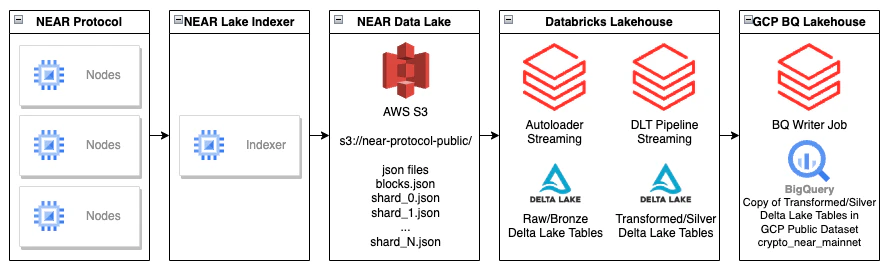
The data is loaded in a streaming fashion using [Databricks Autoloader](https://docs.gcp.databricks.com/ingestion/auto-loader/index.html) into raw/bronze tables, and transformed with [Databricks Delta Live Tables](https://www.databricks.com/product/delta-live-tables) streaming jobs into cleaned/enriched/silver tables.
The silver tables are also copied into the [GCP BigQuery Public Dataset](https://cloud.google.com/bigquery/public-data).
## Architecture
The data is loaded in a streaming fashion using [Databricks Autoloader](https://docs.gcp.databricks.com/ingestion/auto-loader/index.html) into raw/bronze tables, and transformed with [Databricks Delta Live Tables](https://www.databricks.com/product/delta-live-tables) streaming jobs into cleaned/enriched/silver tables.
The silver tables are also copied into the [GCP BigQuery Public Dataset](https://cloud.google.com/bigquery/public-data).
 [Databricks Medallion Architecture](https://www.databricks.com/glossary/medallion-architecture).
## Available Data
The current data that NEAR is providing was inspired by [NEAR Indexer for Explorer](https://github.com/near/near-indexer-for-explorer/).
NEAR plans to improve the data available in the NEAR Public Lakehouse making it easier to consume by denormalizing some tables.
The tables available in the NEAR Public Lakehouse are:
* **blocks**: A structure that represents an entire block in the NEAR blockchain. `Block` is the main entity in NEAR Protocol blockchain. Blocks are produced in NEAR Protocol every second.
* **chunks**: A structure that represents a chunk in the NEAR blockchain. `Chunk` of a `Block` is a part of a `Block` from a `Shard`. The collection of `Chunks` of the `Block` forms the NEAR Protocol Block. `Chunk` contains all the structures that make the `Block`: `Transactions`, [`Receipts`](https://nomicon.io/RuntimeSpec/Receipts), and `Chunk Header`.
* **transactions**: `Transaction` is the main way of interaction between a user and a blockchain. Transaction contains: Signer account ID, Receiver account ID, and Actions.
* **execution\_outcomes**: Execution outcome is the result of execution of `Transaction` or `Receipt`. In the result of the Transaction execution will always be a Receipt.
* **receipt\_details**: All cross-contract (we assume that each account lives in its own shard) communication in Near happens through Receipts. Receipts are stateful in a sense that they serve not only as messages between accounts but also can be stored in the account storage to await `DataReceipts`. Each receipt has a `predecessor_id` (who sent it) and `receiver_id` the current account.
* **receipt\_origin**: Tracks the transaction that originated the receipt.
* **receipt\_actions**: Action Receipt represents a request to apply actions on the `receiver_id` side. It could be derived as a result of a `Transaction` execution or another `ACTION` Receipt processing. Action kind can be: `ADD_KEY`, `CREATE_ACCOUNT`, `DELEGATE_ACTION`, `DELETE_ACCOUNT`, `DELETE_KEY`, `DEPLOY_CONTRACT`, `FUNCTION_CALL`, `STAKE`, `TRANSFER`.
* **receipts (view)**: It's recommended to select only the columns and partitions (`block_date`) needed to avoid unnecessary query costs. This view join the receipt details, the transaction that originated the receipt and the receipt execution outcome.
* **account\_changes**: Each account has an associated state where it stores its metadata and all the contract-related data (contract's code + storage).
**Additional information about the data**
* Skipped Blocks: NEAR Blockchain can contain skipped blocks, e.g. block `57730443`. For these cases we can find the block for the chunk data using the `prev_block_hash` column, e.g. `SELECT * FROM chunks c JOIN blocks b ON c.chunk.header.prev_block_hash = b.header.prev_hash`.
**References**
* [Protocol documentation](/getting-started/what-is-near)
* [Near Data flow](/protocol/data-flow/near-data-flow)
* [Protocol specification](https://nomicon.io/)
[Databricks Medallion Architecture](https://www.databricks.com/glossary/medallion-architecture).
## Available Data
The current data that NEAR is providing was inspired by [NEAR Indexer for Explorer](https://github.com/near/near-indexer-for-explorer/).
NEAR plans to improve the data available in the NEAR Public Lakehouse making it easier to consume by denormalizing some tables.
The tables available in the NEAR Public Lakehouse are:
* **blocks**: A structure that represents an entire block in the NEAR blockchain. `Block` is the main entity in NEAR Protocol blockchain. Blocks are produced in NEAR Protocol every second.
* **chunks**: A structure that represents a chunk in the NEAR blockchain. `Chunk` of a `Block` is a part of a `Block` from a `Shard`. The collection of `Chunks` of the `Block` forms the NEAR Protocol Block. `Chunk` contains all the structures that make the `Block`: `Transactions`, [`Receipts`](https://nomicon.io/RuntimeSpec/Receipts), and `Chunk Header`.
* **transactions**: `Transaction` is the main way of interaction between a user and a blockchain. Transaction contains: Signer account ID, Receiver account ID, and Actions.
* **execution\_outcomes**: Execution outcome is the result of execution of `Transaction` or `Receipt`. In the result of the Transaction execution will always be a Receipt.
* **receipt\_details**: All cross-contract (we assume that each account lives in its own shard) communication in Near happens through Receipts. Receipts are stateful in a sense that they serve not only as messages between accounts but also can be stored in the account storage to await `DataReceipts`. Each receipt has a `predecessor_id` (who sent it) and `receiver_id` the current account.
* **receipt\_origin**: Tracks the transaction that originated the receipt.
* **receipt\_actions**: Action Receipt represents a request to apply actions on the `receiver_id` side. It could be derived as a result of a `Transaction` execution or another `ACTION` Receipt processing. Action kind can be: `ADD_KEY`, `CREATE_ACCOUNT`, `DELEGATE_ACTION`, `DELETE_ACCOUNT`, `DELETE_KEY`, `DEPLOY_CONTRACT`, `FUNCTION_CALL`, `STAKE`, `TRANSFER`.
* **receipts (view)**: It's recommended to select only the columns and partitions (`block_date`) needed to avoid unnecessary query costs. This view join the receipt details, the transaction that originated the receipt and the receipt execution outcome.
* **account\_changes**: Each account has an associated state where it stores its metadata and all the contract-related data (contract's code + storage).
**Additional information about the data**
* Skipped Blocks: NEAR Blockchain can contain skipped blocks, e.g. block `57730443`. For these cases we can find the block for the chunk data using the `prev_block_hash` column, e.g. `SELECT * FROM chunks c JOIN blocks b ON c.chunk.header.prev_block_hash = b.header.prev_hash`.
**References**
* [Protocol documentation](/getting-started/what-is-near)
* [Near Data flow](/protocol/data-flow/near-data-flow)
* [Protocol specification](https://nomicon.io/)