> ## Documentation Index
> Fetch the complete documentation index at: https://docs.near.org/llms.txt
> Use this file to discover all available pages before exploring further.
# Access Keys
> Learn about NEAR's access key system with Full-Access Keys for complete account control and Function-Call Keys for restricted, shareable permissions to specific contracts.
In NEAR, users control their accounts using access keys, which can be full-access keys or function-call keys. Full-access keys allow complete control over the account, while function-call keys restrict actions to specific contracts. This system enables secure sharing of permissions and simplifies user interactions with applications.
***
## Access Keys
In most blockchains, users control their accounts by holding a single [`private key`](https://en.wikipedia.org/wiki/Public-key_cryptography) (a secret only they know) and using it to sign [transactions](/protocol/transactions).
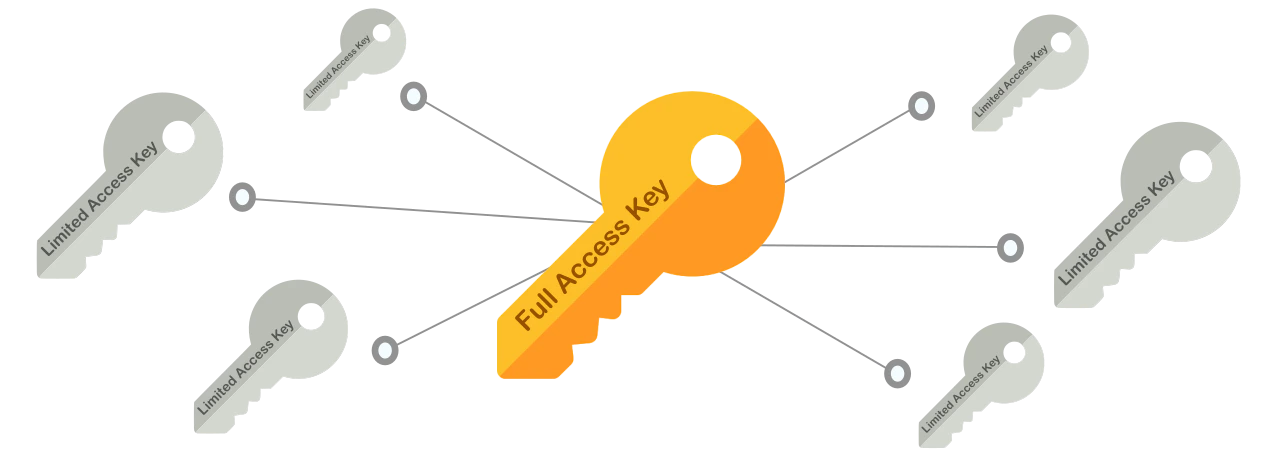 In NEAR we distinguish two types of Access Keys:
1. `Full-Access Keys`: Have full control over the account, and should **never be shared**
2. `Function-Call Keys`: Can only sign calls for specific contracts, and are **meant to be shared**
Every account in NEAR can hold **multiple keys**, and keys can be added or removed, allowing a
fine-grained control over the account's permissions.
***
## Function-Call Keys
`Function-Call` keys can only sign transactions calling a **specific contract**, and do **not allow** to **attach NEAR tokens** to the call.
They are defined by three attributes:
1. `receiver_id`: The **only contract** which the key allows to call, no other contract can be called with this key
2. `method_names` (Optional): The contract's **methods** the key allows to call. If omitted, all contract's methods can be called
3. `allowance` (Optional): The **amount of NEAR** allowed to be spent on [gas](/protocol/transactions/gas). If omitted, the key can consume **unlimited** gas
`Function Call Keys` are meant to be shared with applications, so third-parties can make contract calls in your name. This is useful in multiple scenarios as we will see below.
`Function-Call` keys are secure to share, as they only permit calls to a specific contract and prohibit NEAR token transfers
***
## Full-Access Keys
As the name suggests, `Full-Access` keys have full control of an account, meaning they can be used to sign [transactions](/protocol/transactions) doing any action in your account's behalf:
1. Transfer NEAR Ⓝ
2. Delete your account or create sub-accounts of it
3. Add or remove Access Keys
4. Deploy a smart contract in the account
5. Call methods on any contract
You should never share your `Full-Access`, otherwise you are giving **total control over the account**.
[Implicit accounts](./account-id#implicit-address) already have a `Full-Access Key` by default, while for [`named accounts`](./account-id#named-address) their first `Full-Access Key` is added on creation
***
## Limited Access Key Caveats
### Account with Only Function-Call Keys
If an account has **no full-access keys** and only function-call keys, it becomes effectively restricted:
* It **cannot** transfer NEAR, delete itself, or manage its own keys
* It can **only** perform the specific contract calls defined by the key's `receiver_id` and `method_names`
This is useful for creating restricted sub-accounts (e.g. for [chain signatures](../../chain-abstraction/chain-signatures)), but be aware the account cannot be recovered or reconfigured through standard transactions.
Creating a sub-account with only a single function-call key means that account will **never** be able to remove itself, transfer NEAR out, or add new keys — unless the target contract provides a method to do so.
### Allowance Exhaustion
The `allowance` field defines how much NEAR the key can spend on gas fees:
* If set to a specific amount and fully consumed → the key becomes **unusable** and no new transactions can be signed
* If set to `0` or omitted → **unlimited** allowance (the key has no gas budget restriction)
If an account has only function-call keys and the allowance runs out, the account is permanently locked from initiating any transaction. Either use unlimited allowance (`0`) or ensure the account is topped up with NEAR before the allowance is exhausted.
***
## Locked Accounts
If you remove all keys from an account, then the account will become **locked**, meaning that no external actor can perform transactions in the
account's name.
In practice, this means that only the account's smart contract can transfer assets, create sub-accounts, or update its code.
Locking an account is very useful when one wants to deploy a contract, and let the community be assured that only the contract is in control of the account.
An account could still add keys to itself through a smart contract, effectively allowing the contract to unlock the account. Notice that this can only be done if the contract is deployed before the account is locked
In NEAR we distinguish two types of Access Keys:
1. `Full-Access Keys`: Have full control over the account, and should **never be shared**
2. `Function-Call Keys`: Can only sign calls for specific contracts, and are **meant to be shared**
Every account in NEAR can hold **multiple keys**, and keys can be added or removed, allowing a
fine-grained control over the account's permissions.
***
## Function-Call Keys
`Function-Call` keys can only sign transactions calling a **specific contract**, and do **not allow** to **attach NEAR tokens** to the call.
They are defined by three attributes:
1. `receiver_id`: The **only contract** which the key allows to call, no other contract can be called with this key
2. `method_names` (Optional): The contract's **methods** the key allows to call. If omitted, all contract's methods can be called
3. `allowance` (Optional): The **amount of NEAR** allowed to be spent on [gas](/protocol/transactions/gas). If omitted, the key can consume **unlimited** gas
`Function Call Keys` are meant to be shared with applications, so third-parties can make contract calls in your name. This is useful in multiple scenarios as we will see below.
`Function-Call` keys are secure to share, as they only permit calls to a specific contract and prohibit NEAR token transfers
***
## Full-Access Keys
As the name suggests, `Full-Access` keys have full control of an account, meaning they can be used to sign [transactions](/protocol/transactions) doing any action in your account's behalf:
1. Transfer NEAR Ⓝ
2. Delete your account or create sub-accounts of it
3. Add or remove Access Keys
4. Deploy a smart contract in the account
5. Call methods on any contract
You should never share your `Full-Access`, otherwise you are giving **total control over the account**.
[Implicit accounts](./account-id#implicit-address) already have a `Full-Access Key` by default, while for [`named accounts`](./account-id#named-address) their first `Full-Access Key` is added on creation
***
## Limited Access Key Caveats
### Account with Only Function-Call Keys
If an account has **no full-access keys** and only function-call keys, it becomes effectively restricted:
* It **cannot** transfer NEAR, delete itself, or manage its own keys
* It can **only** perform the specific contract calls defined by the key's `receiver_id` and `method_names`
This is useful for creating restricted sub-accounts (e.g. for [chain signatures](../../chain-abstraction/chain-signatures)), but be aware the account cannot be recovered or reconfigured through standard transactions.
Creating a sub-account with only a single function-call key means that account will **never** be able to remove itself, transfer NEAR out, or add new keys — unless the target contract provides a method to do so.
### Allowance Exhaustion
The `allowance` field defines how much NEAR the key can spend on gas fees:
* If set to a specific amount and fully consumed → the key becomes **unusable** and no new transactions can be signed
* If set to `0` or omitted → **unlimited** allowance (the key has no gas budget restriction)
If an account has only function-call keys and the allowance runs out, the account is permanently locked from initiating any transaction. Either use unlimited allowance (`0`) or ensure the account is topped up with NEAR before the allowance is exhausted.
***
## Locked Accounts
If you remove all keys from an account, then the account will become **locked**, meaning that no external actor can perform transactions in the
account's name.
In practice, this means that only the account's smart contract can transfer assets, create sub-accounts, or update its code.
Locking an account is very useful when one wants to deploy a contract, and let the community be assured that only the contract is in control of the account.
An account could still add keys to itself through a smart contract, effectively allowing the contract to unlock the account. Notice that this can only be done if the contract is deployed before the account is locked