

How it works
A basic relayer consists of a web server housing a funded NEAR account. This account receives an encoded signed transaction, which can subsequently be decoded into aSignedDelegate format and transmitted on-chain.
The client can then generate a SignedDelegateAction (a signed message that hasn’t yet been sent), encode it, and transmit it to this server, where it will be relayed onto the blockchain.
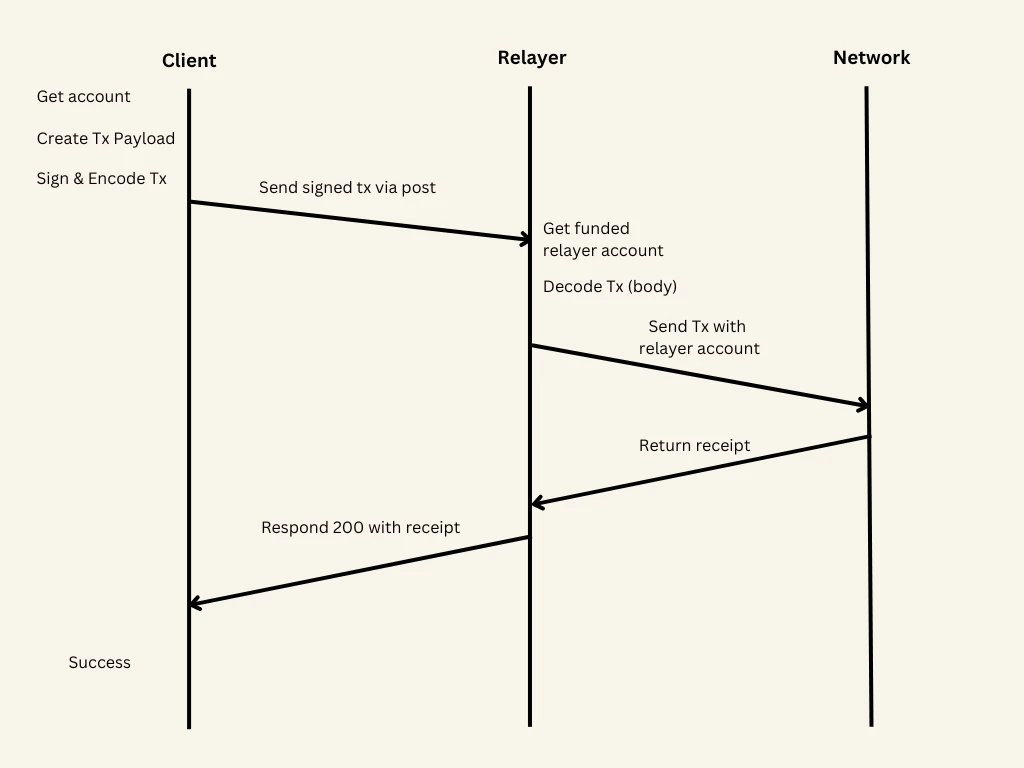
Relayer (server)
- near-api-js
- @near-relay/server
Here’s a simple express endpoint that deserializes the body, instantiates the relayer account and then sends the transaction.You can easily get the account object used to send the transactions from its private key using this snippet
The code in the example only works from the following versions onwards
Client
- near-api-js
- @near-relay/client
In this method we are creating an arbitrary smart contract call, instantiating an account and using it to sign but not send the transaction. We can then serialize it and send it to the relayer where it will be delegated via the previously created endpoint.
Relaying with wallets
Relaying with wallets
At the moment, wallet selector standard doesn’t support signing transactions without immediately sending them. This functionality is essential for routing transactions to a relayer. Therefore, to smoothly integrate relaying on the client side, it’s necessary to be able to sign transactions without relying on wallets.
Progress is being made to make this possible in the future.
High volume parallel processing
When running a relayer that handles a large number of transactions, you will quickly run into anonce collision problem. At the protocol level, transactions have a unique number that identifies them (nonce) that helps to mitigate reply attacks. Each key on an account has its own nonce, and the nonce is expected to increase with each signature the key creates.
When multiple transactions are sent from the same access key simultaneously, their nonces might collide. Imagine the relayer creates 3 transactions Tx1, Tx2, Tx3 and send them in very short distance from each other, and lets assume that Tx3 has the largest nonce. If Tx3 ends up being processed before Tx1 (because of network delays, or a node picks Tx3 first), then Tx3 will execute, but Tx1 and Tx2 will fail, because they have smaller nonce!
Since nearcore 2.13, the native solution to this problem is a gas key: a single access key with up to 1,024 independent nonce lanes and its own prepaid gas balance. The relayer signs each concurrent transaction on a different lane (via the transaction’s nonce_index), so nonces can never collide, and the gas spent on relaying is isolated from the account’s main balance. This replaces the key-rotation workaround below with one key to manage.
On earlier versions, the way to mitigate this is to sign each transaction with a different key. Adding multiple full access keys to the NEAR account used for relaying (up to 20 keys can make a significant difference) will help.
Adding keys
Adding keys
Gating the relayer
In most production applications it’s expected that you want to be able to gate the relayer to only be used in certain cases. This can be easily accomplished by specifying constraints inside theSignedDelegate.delegateAction object.
Rust Relayer Server
The open-source Rust reference implementation of a Relayer server offers the following features:Features can be combined as needed. Use of one feature does not preclude the use of any other feature unless specified.
- Sign and send Meta Transactions to the RPC to cover the gas costs of end users while allowing them to maintain custody of their funds and approve transactions (
/relay,/send_meta_tx,/send_meta_tx_async,/send_meta_tx_nopoll) - Sign Meta Transactions returning a Signed Meta Transaction to be sent to the RPC later - (
/sign_meta_tx,/sign_meta_tx_no_filter) - Only pay for users interacting with certain contracts by whitelisting contracts addresses (
whitelisted_contractsinconfig.toml) - Specify gas cost allowances for all accounts (
/update_all_allowances) or on a per-user account basis (/create_account_atomic,/register_account,/update_allowance) and keep track of allowances (/get_allowance) - Specify the accounts for which the relayer will cover gas fees (
whitelisted_delegate_action_receiver_idsinconfig.toml) - Only allow users to register if they have a unique Oauth Token (
/create_account_atomic,/register_account) - Relayer Key Rotation:
keys_filenamesinconfig.toml - Integrate with FastAuth SDK
- Mix and Match configuration options
Basic Setup
You can follow these steps to set up your local Relayer server development environment:- Install Rust for NEAR Development
- If you don’t have a NEAR account, create one
- With the account from step 2, create a JSON file in this directory in the format
using a Full Access Key from an account that has enough NEAR to cover the gas costs of transactions your server will be relaying. Usually, this will be a copy of the json file found in the
.near-credentialsdirectory. - Update values in
config.toml - Open up the
portfromconfig.tomlin your machine’s network settings - Run the server using
cargo run.(OPTIONAL) To run with logs (tracing) enabled run
RUST_LOG=tower_http=debug cargo run
Optional setupIf you’re integrating with FastAuth make sure to enable feature flags:If you’re using shared storage, make sure to enable feature flags:
Redis Setup
- Install Redis.
Steps 2 & 3 assume Redis was installed on machine instead of a Docker setup. If you’re connecting to a Redis instance running in GCP, follow the above steps to connect to a VM that will forward requests from your local relayer server to Redis running in GCP
- Run
redis-server --bind 127.0.0.1 --port 6379- make sure the port matches theredis_urlin theconfig.toml. - Run
redis-cli -h 127.0.0.1 -p 6379
Advanced setup
- Multiple Key Generation: this is optional, but recommended for high throughput to prevent nonce race conditions. Check
- Docker Deployment: instructions to deploy with Docker
- Cloud Deployment: instructions to deploy on Cloud providers
API Specifications
You can find the complete Relayer server API specification on the GitHub repository.Use cases
The examples folder on the GitHub repository contains example configuration files corresponding to different use cases.These files are for reference only and you should update the
config.toml values before using it on your development environment.No filters
This is a config for a relayer that covers gas for all user transactions to all contracts with no filters. To prevent abuse, this should only be used if there’s only a secure backend calling the relayerBasic whitelist
This is a configuration for a basic relayer that covers gas for user transactions to interact with a whitelisted set of contractsRedis
This is a configuration for a relayer that covers gas for user transactions up to a allowance specified in Redis to interact with a whitelisted set of contracts.- Allowances are on a per-account id basis and on signup (account creation in Redis and on-chain) an OAuth token is required to help with sybil resistance
redis.toml
FastAuth
Closed access betaFastAuth is currently in a private beta stage. If you want to try it out during this early development stage, please contact us on Telegram.
- It covers gas for user transactions up to a allowance specified in Redis to interact with a whitelisted set of contracts.
- Allowances are on a per-account id basis and on signup (account creation in Redis and on-chain) an OAuth token is required to help with sybil resistance
- This also makes use of a shared storage functionality on the Near Social DB contract
- and a whitelisted sender (
whitelisted_delegate_action_receiver_ids) fastauth.toml
Pay with fungible tokens
This is a configuration for a relayer that ensures there’s FTs sent to a burn address used to cover the equivalent amount of gas for user transactions to interact with a whitelisted set of contractsWhitelist senders
This is a config for a relayer that covers gas for a whitelisted set of users’ transactions to interact with a whitelisted set of contractswhitelist_senders.toml(whitelisted_delegate_action_receiver_ids)
Shared storage
This is a configuration for a relayer that covers BOTH gas AND storage fees for user transactions to interact with a whitelisted set of contracts- be sure to include shared storage logic based on
shared_storage.rsin your contract that is being whitelisted shared_storage.toml
Exchange withdraw
This is a configuration for a relayer where an exchange running the relayer covers user withdraw fees when they are withdrawing stablecoins on NEAR (e.g.,USDT or USDC)